Modelcore now supports real-time multiplayer. Open a project, invite your team, and work together on the same model simultaneously.
What you can do today
Edit together without conflicts. When you're editing a solid, you get a lock. Your teammates can see what you're doing, but they won't accidentally overwrite your work. When you're done, the lock releases and someone else can take over.
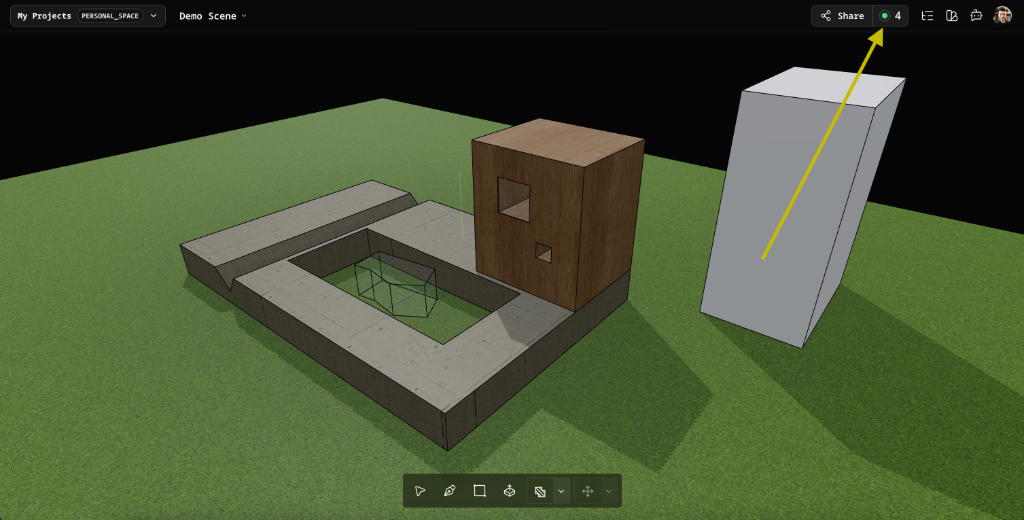
See who's in your project. When collaborators join, you'll see their names and cursors in the viewport. Watch their selections and follow along as they work.
Sketch freely. Loose geometry (lines, rectangles, faces not yet part of a solid) doesn't require locks. Everyone can sketch at the same time without stepping on each other.
Stay in sync. Edits appear on everyone's screen within milliseconds. If you lose connection briefly, you'll automatically catch up when you reconnect.
How it works
Traditional collaboration tools try to merge conflicting edits. That works for text. It doesn't work for 3D geometry, where the order of operations matters and "merging" two conflicting extrusions isn't meaningful.
Instead, Modelcore uses a simple model: when you're editing a solid, you own it. Others can watch, but only you can change it. This keeps the collaboration predictable and avoids the "your model is corrupted" surprises that plague other tools.
Under the hood, we broadcast commands rather than syncing geometry state. This works because our deterministic ID system ensures that the same command produces identical results on every client.
For architects, designers, and engineers working together on spatial models, this means fewer sync errors, less rework, and a clearer sense of who's doing what.
Coming next
We're working on features to make collaboration even smoother:
Commenting. Leave notes attached to faces, edges, or locations in the model. Get notified when someone replies.
Follow cursor. Click a teammate's avatar to jump to their view and follow along as they navigate the model.
Presence indicators. See at a glance who's active in the project vs. who stepped away.
Try it now
Multiplayer is available to all users in the beta. Open any project, click "Share," and invite your collaborators.
We'd love to hear how you're using it. Feedback? Ideas for what we should build next? Use the Feedback button in the app to share your thoughts or browse what others are suggesting.